Smart TV · Android · iOS

Your TV, feels like home

HOMY Player is a fast, beautiful media player built for the remote control. Add your own playlist once on our website — then enjoy live TV, movies and series on every screen at home.

LG webOSSamsung TizenAndroid TVFire TVAndroid phoneiPhoneApple TV
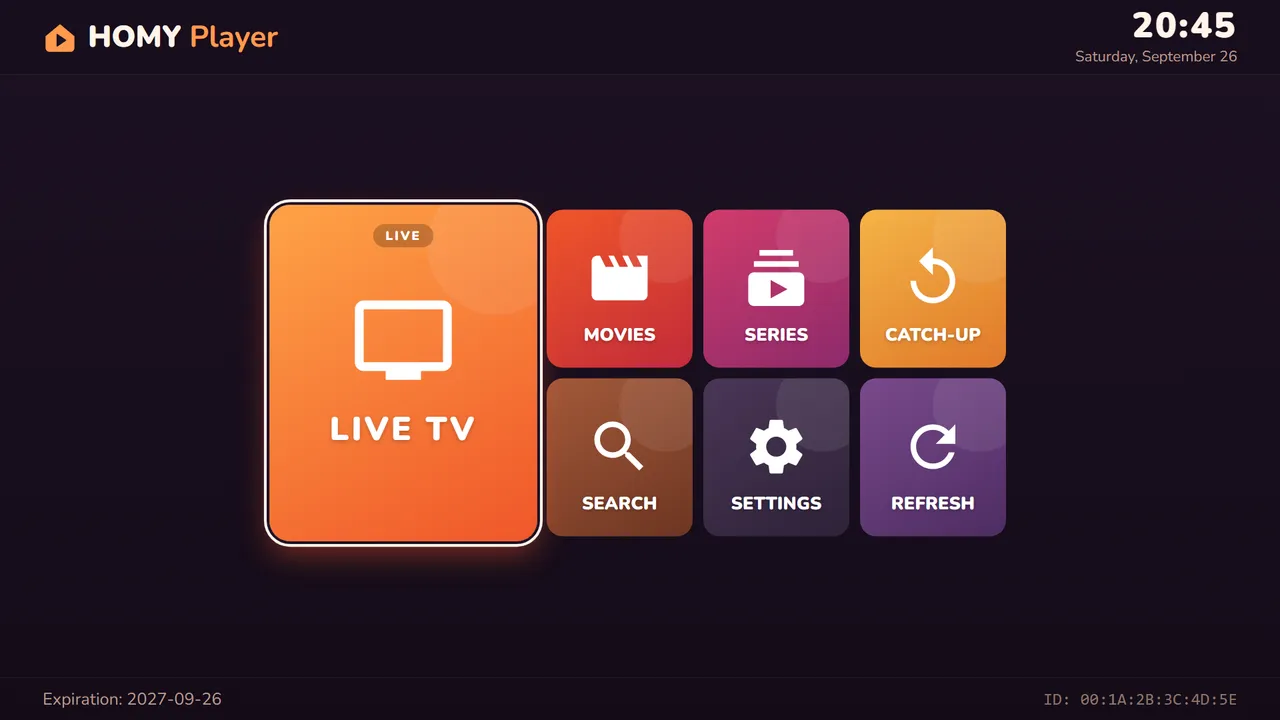
HOMY Player home screen on a TV
15 daysFree trial, no card needed
6-digit PINSecure link between site and TV
0 typingPlaylist added from your phone
HTTPSEncrypted, we never track what you watch
Features

Everything you need, nothing you don’t

Designed for the couch: big tiles, clear focus, and every feature one click away on your remote.

Live TV with guide

Channels by category with what’s on now and next, and a live preview.

Movies

Browse by category with posters, ratings, plot and cast details.

Series

Seasons and episodes neatly organised, with the next episode one click away.

Catch-up

Missed a show? Replay past programmes on channels that support it.

Favourites

Pin your favourite channels with one button and find them first.

Continue watching

Pick up films and episodes exactly where you left off.

Parental control

Lock adult categories behind a PIN so the whole family can use the TV safely.

Global search

Find any channel, film or series across your whole playlist in seconds.

Screenshots

See it on your TV

The real HOMY Player interface, exactly as it appears on your screen.

HOMY Player screenshot

Home: every section in one big, remote-friendly screen.

How it works

Ready in 3 simple steps

No typing long links with your remote: you add your playlist from your phone or computer.

1

Open HOMY Player

Install the app on your device and open it. Your Device ID and 6-digit PIN code are shown on screen.

00:1A:2B:3C:4D:5E482915
2

Add your playlist online

On your phone or computer, go to homyplayer.com/setup, enter your Device ID and PIN, then your Xtream Codes details or M3U link.

3

Press Reload

Back on your TV, press Reload. Your channels, movies and series load automatically — enjoy!

Add your playlist now →
Devices

One player for every screen

Each device gets its own Device ID and PIN. Add a playlist to each screen you want to use.

LG Smart TV

webOS 6.0 and later

Coming soon

Samsung Smart TV

Tizen 5.5 and later

Coming soon

Android TV & Fire TV

TV boxes and sticks

Coming soon

Android phone

Phones and tablets

Coming soon

iOS

iPhone and Apple TV

Coming soon
Playlist formats

Works with the format your provider gives you

Use the details from your own IPTV subscription — we support the two standard formats.

Xtream Codes

Server URL, username and password. Unlocks categories, movies, series, TV guide and catch-up.

http://provider.com:8080 · username · password

M3U playlist link

Your provider’s full playlist link, including your username and password.

http://provider.com/get.php?username=USER&password=PASS&type=m3u_plus
FAQ

Frequently asked questions

Does HOMY Player include channels or content?

No. HOMY Player is a media player only. It does not provide, sell or host any channels, films or series. You need your own playlist from a provider you are legally entitled to use.

Where do I find my Device ID and PIN code?

Open HOMY Player on your device: the Device ID and the 6-digit PIN code are displayed on the first screen, and you can find them again anytime in Settings.

Why do I add my playlist on the website instead of in the app?

Typing long links and passwords with a TV remote is painful. On homyplayer.com/setup you can paste them from your phone or computer in seconds, and your TV receives them securely when you press Reload.

Is there a free trial?

Yes. Every new device gets a free 15-day trial with full access and no credit card required.

How do I change or remove my playlist?

Go back to homyplayer.com/setup, enter your Device ID and PIN, then edit, replace or delete your playlist. Press Reload on your TV to apply the change.

Can I protect my playlist details?

Yes. When saving your playlist, you can add an optional 4-digit protection code. Your details stay hidden and can only be edited with that code.

Can I use HOMY Player on several devices?

Yes. Each device has its own Device ID and PIN, so simply add your playlist to each device you want to use.

A channel is not working. What should I do?

HOMY Player plays the streams provided by your playlist. If one channel does not work, the stream usually comes from your provider or subscription. If nothing plays at all, check that your subscription is active, then contact us.

Is my data safe?

Everything is sent over an encrypted HTTPS connection. We never track or log what you watch. See our Privacy Policy for details.
HOMY Player does not provide any content. It is a media player only: you must supply your own playlist from a provider you are legally entitled to use.

Make your TV feel like home

Link your playlist in less than a minute.

Add your playlist →